Up Box

As promised in the last post!  Today, I’ll do a review of the Up Box 3d printer.  The Up Box (below) is quite the impressive 3d printer (scroll past the picture for more review stuff!).

From an aesthetic standpoint, Tiertime definitely employed a few Industrial Designers to get the look just right.  This is something I would display in my living room, not just have in my workshop!  Also, there are three buttons on the side of the printer that do a variety of things like pausing the print, extruding/withdrawing filament, preheating, etc.  And the coolest feature of all is the error detection!  If there is an error with the printer, a particular letter in the green UP BOX text (see picture above) will light up red.  the letter that lights up indicates which error occurred.  Right above the UP BOX text (not visible in the picture) are a series of blue LEDs that indicate preheat/print progress, so that’s also a nice touch.

Now that all the elements of the form are out of the way, let’s talk a bit about function.  There are some very good points with this printer!  The bed is much bigger than the Afinia (10x8x8 for the up box vs 5x5x5 for the afinia), and at $1800, it’s a nice jump up in capability without a massive jump in price from the Afinia.  It produces prints at 200 micron and 150 micron that are every bit as nice as the up minis and afinias, seeing as it uses just about the same head (with some slight modifications).

Now for the downsides… The Up Box claims 100 micron resolution, but I have had a very hard time getting reliable 100 micron prints… I’ve only gotten 2 successful prints, and then the Up Box developed this nasty issue where it would only extrude 2 layers and then just stop sending commands to the motor.  It’s been fairly reliable at 150 and 200 micron resolutions though!  Another downside is that, while the heated chamber helps a little bit, warping with ABS is still an issue for large parts. That can be mitigated though, so it’s not a huge detractor.  Also, the perf board build plate doesn’t clip onto the platform very securely, so I find myself having to use binder clips on the front to keep the plate on the platform… Again, not a huge detractor, but something to be aware of!

Wow!  Looking back over this post, I realized I said a fair bit about the Up Box… I know I promised I’d do a review of both the Up Box and the Formlab Form1+, but I kind of want to give the Formlab it’s own post since I have a lot to say about it (spoiler alert: not a lot good to say about it… read the next post for details 😉 ).

Until next time!

John (aka the Mad Printer)

Edit: Thinking more about it, the only Formlab Form1+ I have used was a very defective unit, so I can’t in all fairness write a good review on it.  The next post will skip the Formlab.
And Now for Something Completely Different….

Hey all!  Sorry I didn’t do a post yesterday (as much as I really wanted to)…. I was busy tweaking the 3d print room a little bit, so now that that’s done, I can finally get a round to it: http://www.thingiverse.com/thing:6016!

Now, all punning aside, as I mentioned in my first post, my future projects will be done on a Hyrel 3d printer.  So, as I said, I want to make sure I communicate why I have chosen a Hyrel printer over the others that I have worked with!  In order to do that, I’ll evaluate the pros and cons of all the printers I have worked with (over the course of about a week).

First up: The Up Mini and Afinia H480!

These two printers are both fantastic machines.  From a construction standpoint, they are very well built, with the Afinia H480 having all metal construction (http://afinia.com/3d-printers/h480/)and the Up Mini being enclosed in it’s own little box (http://www.up3dusa.com/#!up-mini/c12oh).  The heads on both these printers are virtually interchangeable, since they have the same internal components, and the heads are very easily disassembled and reassembled (for cleaning and declogging).  At this point, you might be asking “If they both have the same internal components, why is the Afinia H480 more expensive?”…. Fear not dear consumer!  The Afinia H480 is slightly more expensive since it has a bigger build volume (5x5x5 inches-ish) than the Up Mini (4x4x4 inches-ish).  Also, the Afinia H480’s resolution is slightly higher, with 150 micron being the minimum resolution instead of the 200 micron the Up Mini has.

Oh, and they last forever!  I recall hearing from Afinia and Tiertime (the company that makes the Up Mini) that 1000 printing hours is the lifespan of the printers…. However, the Invention Studio has significantly surpassed that.  We have had most of our 36 Up Minis and Afinias for about 1.5 years now (some are newer)… By my calculations (20 hours a day of printing for 1.5 years), the oldest ones have 10,000-ish hours of printing on them, and they’re still going!  That estimate is a bit high since it doesn’t account for school vacations and things where they aren’t in use as much, but it’s still on that order of magnitude past the 1000 hour limit the companies have set!

Bottom Line: These are fantastic printers for an introductory foray into 3d printing and will serve their owners well.

That being said, these printers do have their limitations.

  1. ) The build size if fairly small if you are looking to do anything bigger than action figures or pencil cups.
  2. ) The software is closed source, so you can’t run some of the cooler filaments that exist (i.e. things like ninjaflex, HIPS, etc).  The Up Minis and Afinias only run ABS and PLA, which are fine for most things, but not everything.
  3. ) Up Mini support is very hard to reach for simple questions (although, it stands to mention that Afinia offers tremendous support).

So there you have it!  A review of the bread and butter printers of the 3d printing world (in my opinion… always have to qualify that haha).  Next up, the Up Box, and the Formlab Form1+.  Stay Tuned!

Building the Ideal Space

Before I could start my printing adventure, I needed to build the ideal 3d printing space in my new apartment!  Using everything I had learned as print master at the Invention Studio proved very handy because, with a space that sees at least 100 people per day, room setup and space planning is a very important component of any makerspace (even your personal makerspace).  By following the rules I (and print masters before me) developed for the Invention Studio’s print room, I made my space the absolute best it could be!  Simply put, a 3d printer room needs (IMHO):

1.) Plenty of counter space.  Whether you run one printer or fifty, you need counter space to deal with all the auxiliary activities that come with 3d printing, namely cleaning and post processing of parts, cadding, 3d scanning, and printer repair.

2.) An organized solution for tools!  Throughout my 3d printing journey, I consider the following tools the most important to getting the most out of any 3d printing experience:

  • Hammer
  • Cordless drill
  • Allen wrench set
  • Mini screwdriver set
  • Various grits of sandpaper (from 80-400 grit) to get an ultra-smooth, finished 3d printed part
  • Various chemicals for post processing (i.e. Acetone for ABS, Acrylic glue for PLA – yes acrylic glue has the same affect on PLA that Acetone has on ABS… cool huh?, etc….).  Among the other effective post-processing methods I just outlined is also XTC3d by Smooth On.  It’s an absolutely incredible coating (more about that in a later post).
  • Paint Scraper
  • Heat gun
  • Mini chisel set for removing raft and support
  • Pair of heavy leather gloves (for safe use of paint scraper and chisels)
  • Benchtop vice

3.) A dry erase board for jotting down design ideas/things to do

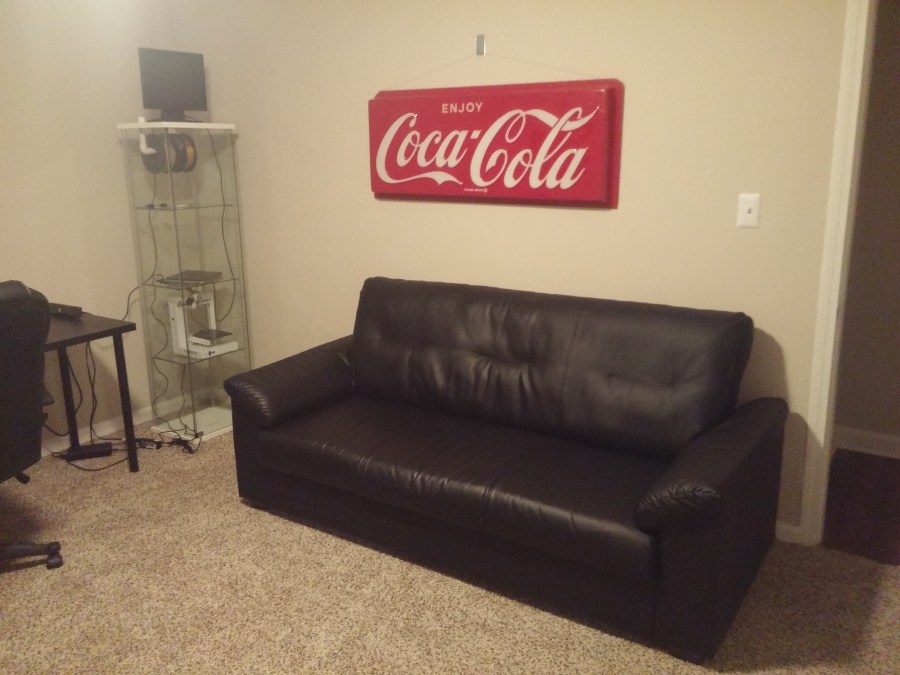
4.) A couch/some sort of seating to create a nice atmosphere

5.) An organized solution for displaying and using your printers, as well as for hanging filament

6.) A place to store all your 3d printing filaments

7.) A very powerful computer with two decent-sized screens (for cadding)

8.) Separate computer to run your printer(s)

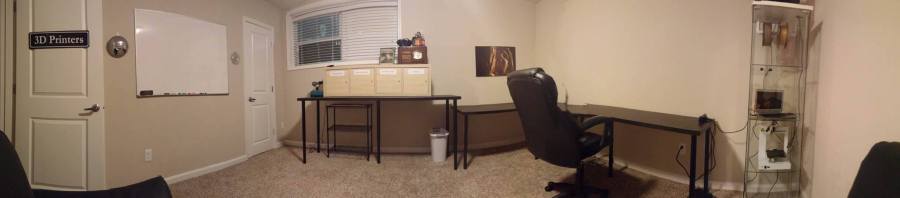
So without further ado, I present my humble print room:

print room (mine)

It’s still as work in progress, as there are a few things from my list that I am missing, but it’s all there for the most part!

I have:

1.) Whiteboard

2.) All the appropriate tools stored in a nice unit with doors (Ikea Kallax)… I also have labels on the doors that tell me what is inside each (“Regular Tools”, “Glues and Screws”, “3d Printing Tools”, “Sanding”)!

3.) A nice way to display the printers (also from Ikea haha).  I modified a stock ikea cabinet and added a filament-hanging system made of PVC pipe, and then I cadded some custom bumpers and printed them out of ninjaflex to keep the filament from moving too far to one side of the shelf.

4.) A computer to run my printer

5.) A couch and a chair to relax in while I wait for prints to complete

6.) plenty of counter space for repairs and print processing

I am currently missing:

1.) A cad computer

2.) 2 decent-sized screens

3.) Benchtop vice

However, like I said, it’s a work in progress….  More to come soon!


John (aka “The Mad Printer” 😉 )

Edit: a visitor to the blog mentioned one crucial thing I forgot to mention… A room that is well-regulated from a temperature standpoint!  If the room is too cold, your 3d prints have the potential to warp more (depending on the material used… some warp more than others)!

Hello World

Hi everyone!  My name’s John and I’m a 3d printing enthusiast.  I figured a fitting first blog post would be to talk a little about my background and how I got into 3d printing.  The biggest 3d printing influence in my life has been the Invention Studio at Georgia Tech (inventionstudio.gatech.edu) (and the fantastic people in it!!).  It’s an awesome student-run makerspace that Georgia Tech has with 40-50 3d printers, among other awesome tools.

Specifically, I served as a 3d print master in the Invention Studio for almost 2 years.  As print master, I was one of 2 people responsible for fixing all 36 of our Up Mini and Afinia H480 3d printers, running jobs on the more advanced 3d printers (more about those later!), training everyone on advanced printer usage and good design practices for 3d printing, and generally keeping the space in order.

Because of my time at the Invention Studio, I have been exposed to (and had a lot of experience using and fixing!) so many 3d printers:

  • Up Mini
  • Afinia H480
  • Up Box
  • Formlab Form1+
  • Leapfrog CreatrXL
  • Makerbot Replicator 2
  • Makerbot Replicator
  • Makerbot Z18
  • Hyrel Engine
  • Hyrel System30M
  • Mcor Iris

I’ve cadded multiple things for printing (and successfully printed them), so I’ve learned a fair bit on my journey.

So, by now, you’re probably asking “why is he telling me all this?” or “why do I care?” :).  Basically, I want to use this blog to chronicle my 3d printing experiences over the past few years and help pass the experience on to either individuals looking to get a printer, or other organizations looking to start a 3d printing-focused makerspace.

I’ll feature projects I’ve done, what I’ve learned by doing said projects, and projects I will do in the future.  My future projects will all be done on the Hyrel Engine, so future projects will talk a lot about my experiences printing with that printer.  However, understanding why I have chosen the Hyrel Engine as one of my personal printers involves knowing my opinions about the other printers I have worked with as well, so stay tuned for an in-depth evaluation of everything!!

Any questions, feel free to use the “contact” page!

John